Quietkeep
Family Emergency Binder

Someone else may have to run your week.

One private place for what your household would need in an emergency you did not plan for — where the documents are, who to call, what the children and pets need, and what to take if you have ten minutes to leave.

Instant download · No subscription · No account · Works on Mac, Windows, tablets & phones

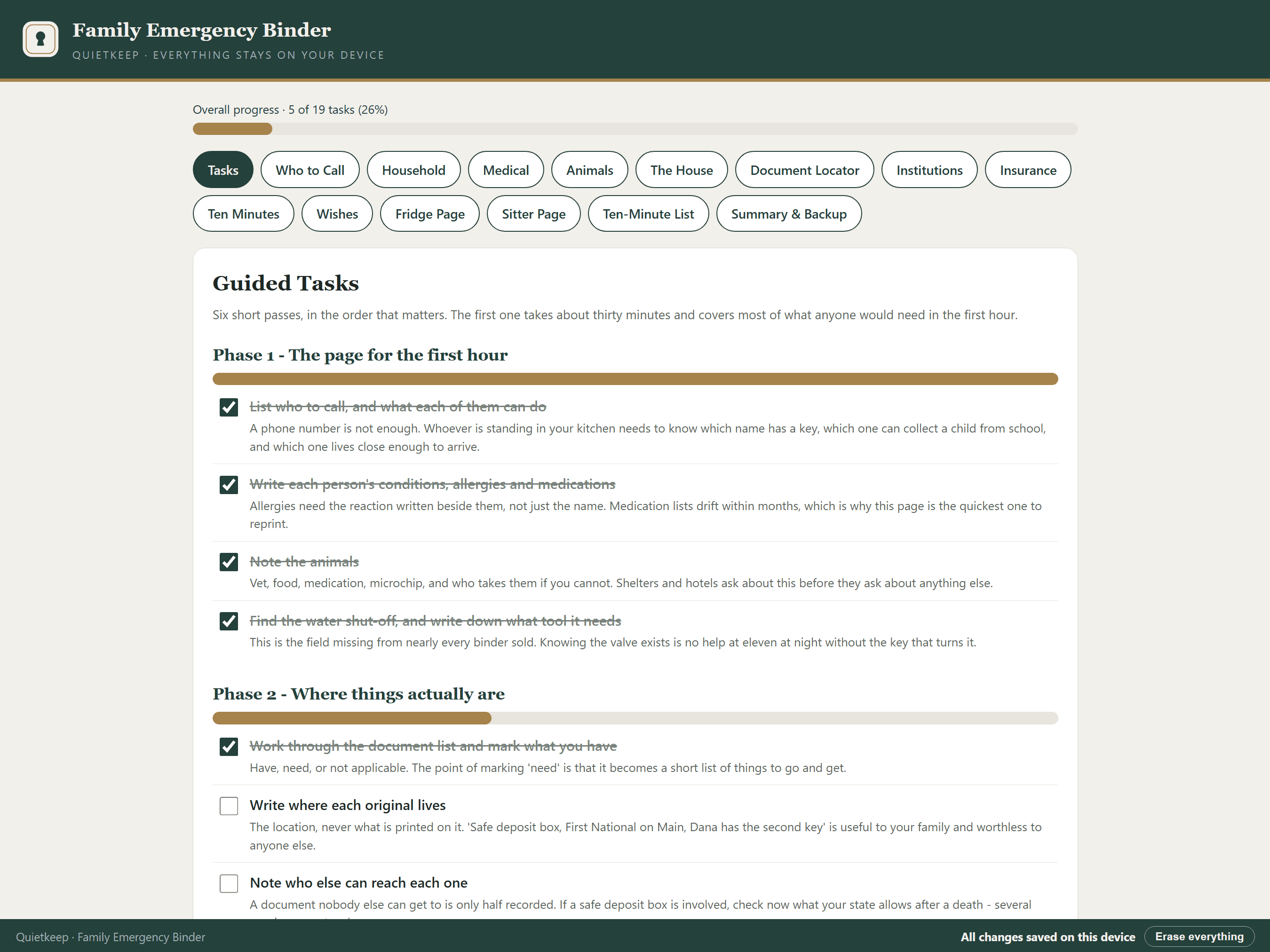
Family Emergency Binder showing the guided tasks, ordered by urgency
Ready to hand over·prints the page someone else needs
Completely private·works with the wi-fi off
$29 once·yours forever
A real app·not a PDF or spreadsheet
Three pages, three different readers

Most emergencies are not the end of anything. They are a week where you cannot be reached, or ten minutes to get out of the house, or a sitter holding a phone that goes to voicemail. The information someone needs in that week is not complicated. It is just scattered — a pediatrician in one phone, a policy in a drawer, a neighbour's number nobody wrote down, and the answer to where the birth certificates are living entirely in your head.

The fridge page

Contacts, medical essentials, animals, shut-offs. It holds nothing that would be dangerous in a kitchen, which is why it can live where a stranger will find it.

The page you hand over

For a sitter, a neighbour, or a relative staying while you are away. Everything they need, and nothing that would matter if they kept it.

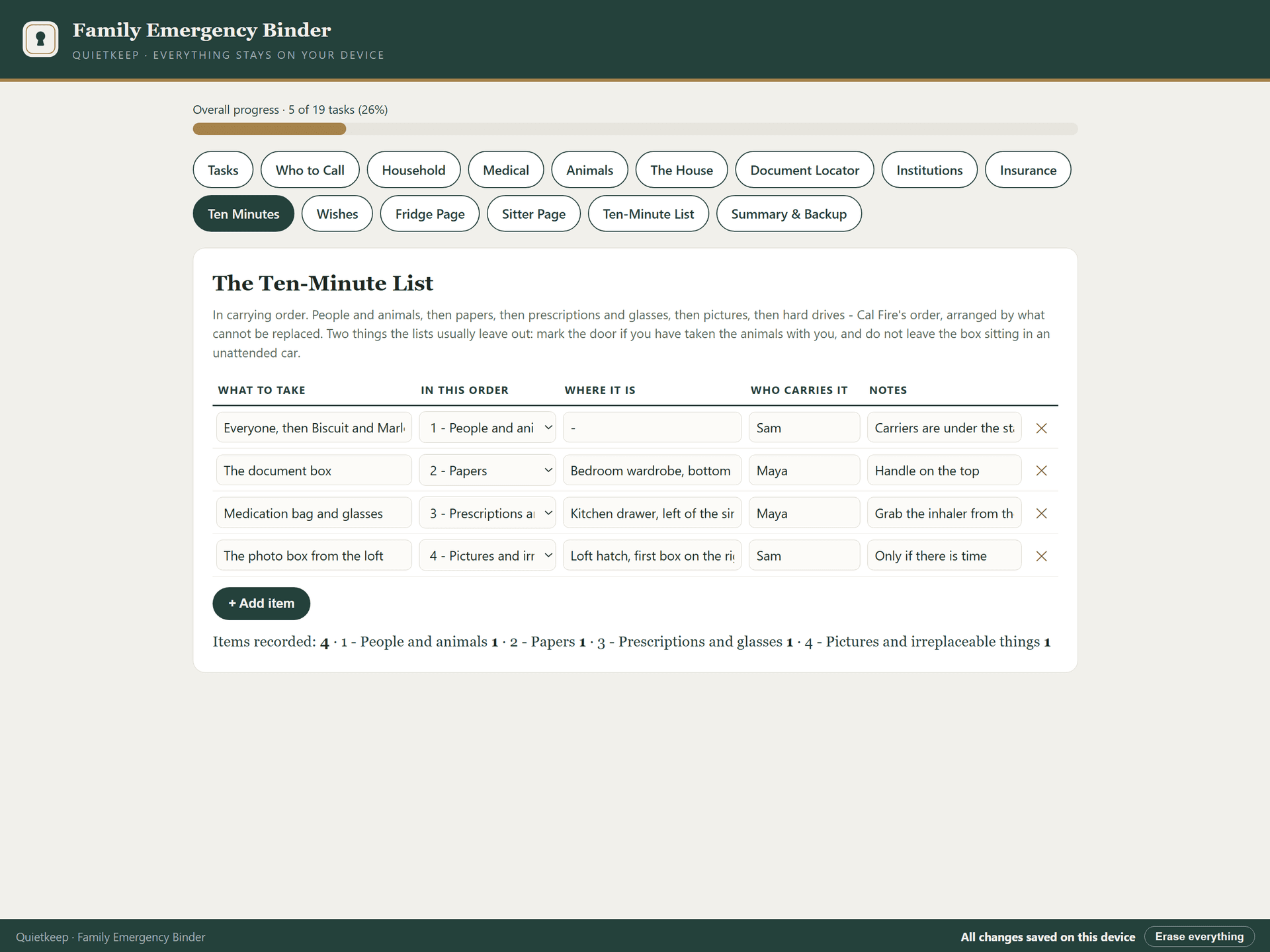
The ten-minute list

What to carry out and in what order, with where each thing is. Print it twice - one for a closet door, one for the car.

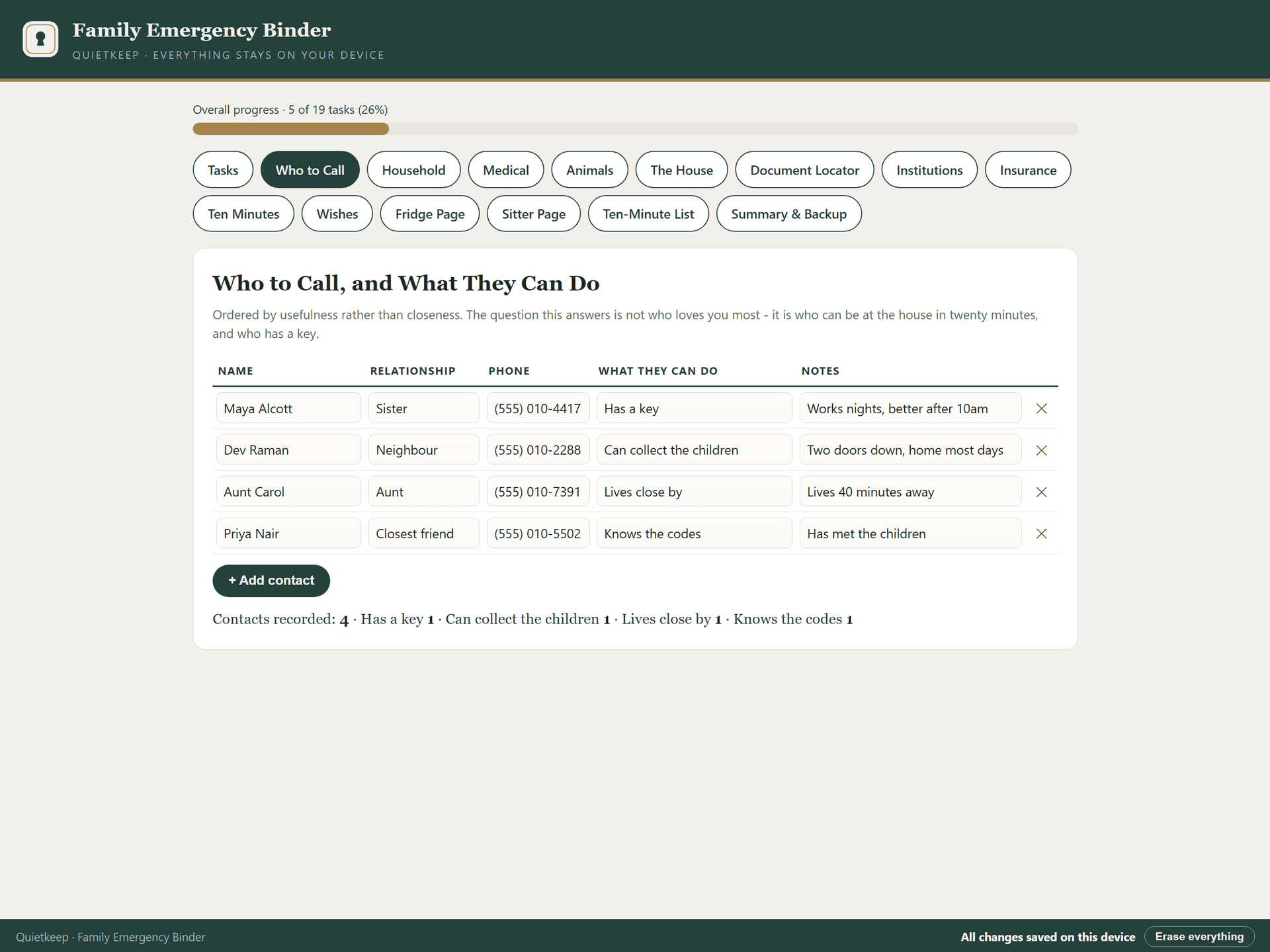
Who to Call register
Not just a number. Who has a key, who can collect a child, who lives close enough to arrive.
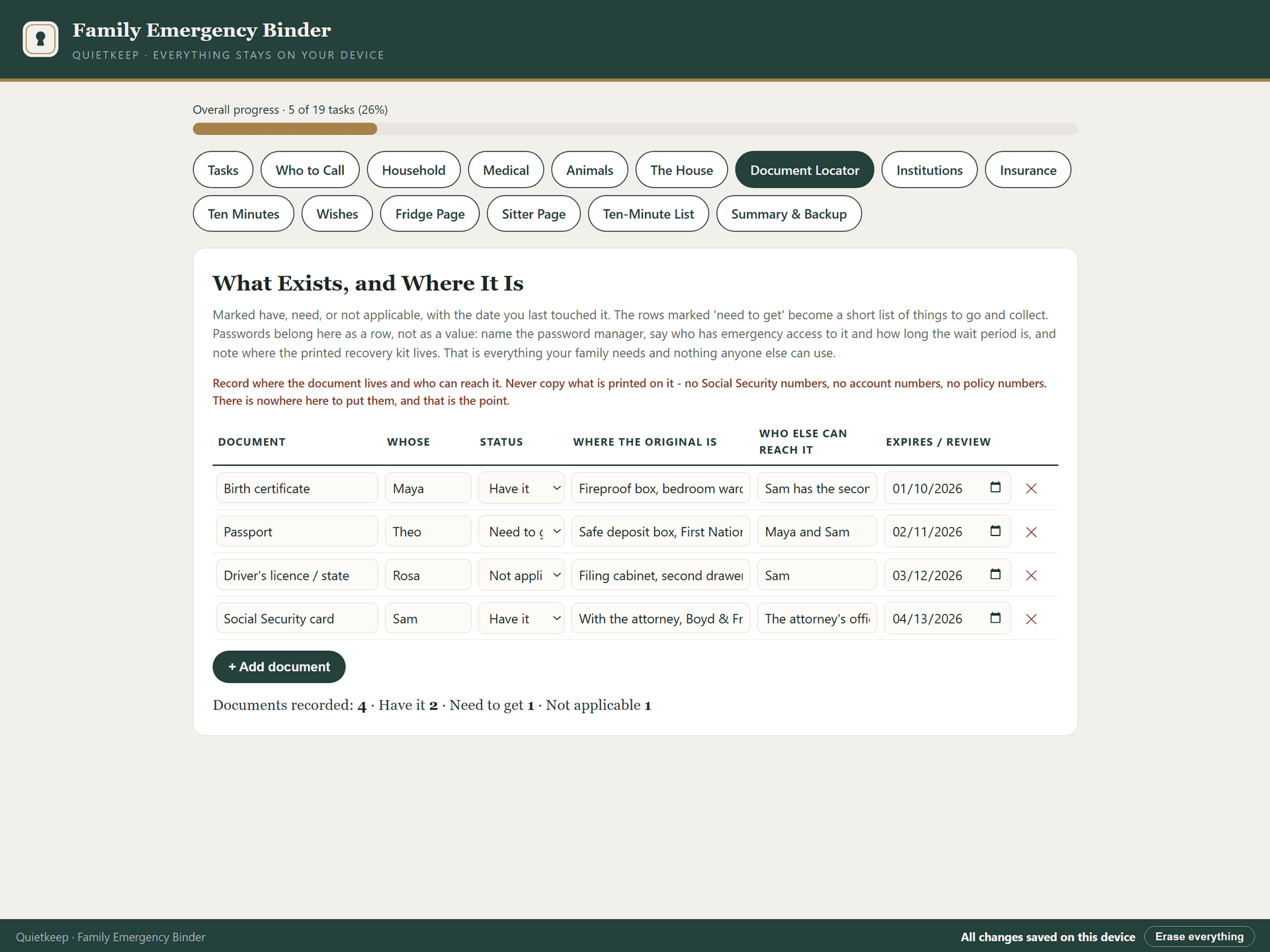
Document Locator register
Where it is, never what it says. Have it, need it, or not applicable - with where the original lives and who else can reach it.
The Ten-Minute List register
In carrying order. People and animals, then papers, then prescriptions - arranged by what cannot be replaced.

Private by design, not by promise

Nothing you type ever leaves your device. It never asks for a Social Security number, an account number, a policy number, a password, or a PIN — there is nowhere in it to put one. That is deliberate: it is what makes the printed pages safe to leave on a fridge or hand to a babysitter.

Why this one is deliberately incomplete

An emergency binder is meant to be found — on a fridge, in a sitter's hand, by whoever arrives first. That is exactly why this one records where things are and who to call, and never account numbers, Social Security numbers, passwords or codes. There is nowhere in it to put them. A binder complete enough to be dangerous is a binder you cannot leave out, which defeats its purpose.

Zero network requests

The app is a single file that runs entirely in your browser, on your device. It makes no connections and loads nothing from the internet. You can run it with Wi-Fi off. The file itself isn't encrypted or password-protected — but by design it holds nothing that would be dangerous in the wrong hands, which is exactly what makes an unlocked binder acceptable.

Never a password

By design, it never asks for or stores passwords or PINs. It records that accounts exist and where your written instructions live — the map, never the keys.

Yours forever

One-time purchase. The file is yours, works offline for life, and will still open years from now, exactly as it does today.

Don't take our word for it — try it

This is the actual app, loaded with a fictional sample plan so you can see it working. Click around. Check off a task. Nothing here is a mockup.

Live demo — a fictional sample plan

The demo resets when you leave the page. The full version saves your work automatically and includes backup & restore.

Family Emergency Binder

$29 once

The emergency binder that holds the map instead of the keys — where everything is and who to call, with nowhere to write a Social Security number, an account number, or a password.

  • Contacts ranked by what each person can actually do, not just their number
  • Medical for each person: conditions, allergies with the reaction, medications with dose
  • The house itself — shut-offs, the tool each one needs, the breaker panel, the wifi
  • A document locator that records where the original is, never what is printed on it
  • Institutions with last four digits and a number to call — the FEMA convention, enforced
  • Insurance with coverage limits and the date you last checked them
  • A ten-minute list in the order you would actually carry things out
  • Three printable pages: one for the fridge, one for a sitter, one for the closet door
  • Auto-save with backup and restore
Get it — $29

If anything doesn't work, email us and we'll make it right: hello@quietkeep.co

Already had the fire, the flood, or the break-in?

Pairs with the Home Inventory & Insurance Claim Organizer: this covers the ten minutes before you leave, that one covers proving what you owned once you are allowed back. The Estate Planning Organizer is the natural next step rather than an alternative — this is the one people actually finish, and finishing it is usually when they notice the larger job is still waiting.

See the claim organizer

Related reading

Free guides on the same topic, no purchase required.

What Not to Put in Your Family Emergency Binder

Nearly every emergency binder checklist tells you to include Social Security cards, card images and passwords. That advice assumes a locked safe. If your binder is meant to be found in a hurry, here is what belongs in it and what does not.

Quiet updates, when it matters

Leave your email and we'll tell you when the next organizer exists. Nothing else — your data stays on your device either way.

Questions, answered plainly

Is this a subscription?+

No. You pay 29 once and the app is yours forever. There is no account, no renewal, and nothing that expires.

Do I need to install anything?+

No. You download a small file, double-click it, and it opens in the browser you already use — on Mac, Windows, tablets, and phones.

Is my information really private?+

Yes, structurally. The app makes zero network requests — you can verify this with Wi-Fi turned off. Your entries live only on your device, and your backup is a file you control.

What if it doesn't work for me?+

Email hello@quietkeep.co and we'll make it right. We answer every message.